
Responsive Reviews, Pricing, and Alternatives (September 2026)

Akash Mandavilli
CEO and Co-Founder of GovEagle
About the author
Akash is a 2x founder with previous experience in AI from Meta and federal sales from IBM. Akash holds a dual-degree from Johns Hopkins University in Economics and Computer Science.

When researching Responsive alternatives, government contractors often realize that commercial RFP tools were not built for the realities of federal proposal work. Responsive may support high-volume sales questionnaires, but federal teams need Excel-based compliance matrices, amendment tracking, native Microsoft Office integration, and deployment options that meet CUI requirements. If your writers are constantly exporting drafts, rebuilding matrices, and toggling between browser tabs and Word documents, the software is slowing you down. In this guide, we break down what federal contractors should expect from modern government proposal software and how those requirements compare to Responsive.
TLDR:
- Responsive requires web-based workflows that force you out of Microsoft Word environments.
- Government contractors need compliance matrices in Excel format and amendment tracking.
- GovEagle works inside Word/Excel/PowerPoint with FedRAMP Authorization for CUI data.
- Teams achieve 30-40% time savings without switching between interfaces or reworking templates
- GovEagle automates capture through submission, including bid/no-bid, gap analysis, and teaming partner identification.
What Is Responsive and How Does It Work?

Responsive is a cloud-based platform that automates responses to RFPs, security questionnaires, and due diligence inquiries. The company targets sales teams across technology, financial services, and other industries, focusing on mid-sized to enterprise organizations handling high volumes of RFP responses.
The software centralizes your content library in a web-based interface where teams store, organize, and reuse past proposal answers. When a new RFP arrives, users search the library for relevant responses, assign sections to team members, and collaborate on drafts. Responsive publicly states it uses Azure OpenAI for AI-powered features like content recommendations, automated rewrites, and net-new content generation.
Teams manage the entire response process within Responsive's web interface, from initial assignment through final review. The system integrates with common sales and CRM applications to pull in opportunity data and connect proposal workflows to your sales pipeline.
Responsive's workflow relies on its proprietary web interface instead of working directly in Microsoft Word. Some users in engineering and proposal fields report that exporting finalized content to Word can be time-consuming, and the import tool for uploading existing content libraries has a learning curve that can feel confusing during initial setup.
Why Consider Responsive Alternatives?
Responsive serves organizations managing RFP workflows across sales teams. The centralized content repository works well for teams submitting similar proposals repeatedly.
Several limitations prompt teams to look for alternatives. The learning curve is steep, with search functionality issues frustrating users. AI-generated responses often require manual corrections for accuracy. Long-term users note that simple actions require multiple clicks buried in menus, while Grid View experiences frequent bugs.
Government contractors encounter specific challenges. Responsive is primarily a web-based workflow. Responsive offers a Microsoft Word integration for accessing response content, but most drafting and workflow management happen in its web interface. There's no purpose-built compliance shredding that generates matrices in Excel format matching industry templates. The system doesn't track RFP amendments, include capture modules for bid/no-bid decisions, or support graphics creation for diagrams like OV-1.
For large projects, question set navigation requires excessive clicking with limited formatting options during content ingestion. Organizations requiring FedRAMP Moderate Equivalency for CUI data or SharePoint integration often need tools built for government contracting workflows.
Get GovCon capture and proposal insights in your inbox.
Best Responsive Alternatives in September 2026
When searching for Responsive alternatives, government contractors should assess tools based on compliance requirements, workflow integration, and federal-specific capabilities.
| Platform | Native MS Office Integration | Compliance Matrix Generation | FedRAMP Certification | Capture Module | Amendment Tracking | Best For |
|---|---|---|---|---|---|---|
| GovEagle | Word, Excel, and PowerPoint add-ins with full native integration | Automated Excel matrices matching industry templates with requirement tracking | FedRAMP Moderate Equivalency with GCC/GCC High and air-gapped deployment support | Complete capture-to-submission including bid/no-bid, gap analysis, and teaming partner identification | Automated amendment monitoring with matrix updates | Government contractors handling compliance-intensive federal RFPs requiring full lifecycle management |
| Responsive | Primarily web-based; offers Microsoft Word integration for accessing response content | Not publicly documented for federal-style compliance automation | No publicly listed FedRAMP authorization | Not publicly documented for federal-style compliance automation | Not publicly documented for federal-style compliance automation | Commercial sales teams managing high-volume RFP responses across industries |
| Loopio | Offers Microsoft Office add-ins; primarily designed for commercial RFP workflows | Not publicly documented for federal-style compliance automation | Not publicly documented for federal-style compliance automation | Not publicly documented for federal-style compliance automation | Not publicly documented for federal-style compliance automation | Enterprise sales teams handling commercial RFPs and security questionnaires with CRM integration needs |
| GovDash | Microsoft Word add-in available; Excel and PowerPoint integrations are not publicly listed | Basic capabilities without automation | No publicly listed FedRAMP authorization | Not publicly documented for federal-style compliance automation | Not publicly documented for federal-style compliance automation | Early-stage government contractors needing opportunity identification bundled with basic proposal tools |
| QorusDocs | Microsoft 365 add-ins for Word, PowerPoint, and Excel (native Microsoft 365 integration) | Not publicly documented for federal-style compliance automation | Not publicly documented for federal-style compliance automation | Not publicly documented for federal-style compliance automation | Not publicly documented for federal-style compliance automation | Sales teams creating commercial responses through content automation |
| AutoRFP.ai | Word, Excel, PDF, and portal import/export; primarily a web-based response workspace | Not designed for federal-style Excel compliance matrix shredding | No publicly listed FedRAMP authorization (ISO 27001 and SOC 2 Type II) | Not designed for federal capture, bid/no-bid, or teaming workflows | Not designed for federal amendment tracking tied to compliance matrices | Commercial sales and proposal teams leaving Responsive for source-cited AI drafts on RFPs, security questionnaires, and DDQs |
GovEagle

GovEagle was built for government contractors handling compliance-intensive federal RFPs. The system accelerates proposal creation from weeks to hours while maintaining strict compliance standards. Native Microsoft Word, Excel, and PowerPoint add-ins let you work in familiar environments without reworking templates. We generate compliance matrices in Excel format that mirror human creation, tracking every requirement without forcing you into rigid structures. You get complete capture-to-submission coverage including bid/no-bid analysis, capture deck automation, gap analysis, teaming partner identification, and amendment tracking. We maintain FedRAMP Moderate Equivalency with support for GCC/GCC High environments, air-gapped deployments, and zero data retention.
Loopio

Loopio serves enterprise sales teams handling commercial RFPs, security questionnaires, and due diligence responses through a centralized, web-based content library with AI-suggested answers. The system is designed for high-volume, repeatable sales workflows where teams reuse standardized content across similar opportunities. Users collaborate inside Loopio’s browser interface, assign questions to subject matter experts, and pull approved answers from a shared repository to speed up response assembly. The tool integrates with CRM systems like Salesforce and HubSpot to align proposal activity with pipeline data and revenue tracking.
While this approach works well for commercial sales environments, Loopio is not built around the compliance-heavy structure of federal RFPs. It does not generate Excel-based compliance matrices that mirror government contracting templates, nor does it automate requirement shredding tied to structured matrix tracking. Loopio offers Microsoft Office add-ins (including Word) for working with library content in Office documents. However, federal teams may still need additional tooling for structured compliance matrix automation and amendment-driven requirement tracking. Loopio also does not provide FedRAMP certifications or government-focused deployment options for teams handling CUI data.
GovDash

GovDash combines opportunity identification with proposal tools for early-stage government contractors entering the federal market. The system brings SAM and related opportunity data into a single interface, helping small businesses search, track, and manage potential bids alongside lightweight proposal drafting features. By bundling contract management and pipeline visibility with basic response tools, GovDash aims to support companies that do not yet have a formal capture or proposal infrastructure in place.
While this bundled approach may appeal to newer contractors, the proposal functionality is limited for teams handling compliance-intensive federal RFPs. GovDash provides a Microsoft Word assistant/add-in and integrates with Microsoft 365/SharePoint. Excel and PowerPoint add-ins are not publicly listed. It lacks automated Excel compliance matrix generation tied to requirement shredding, structured amendment tracking that updates matrices in real time, and advanced capture workflows such as bid and no-bid decision support, gap analysis, or teaming partner identification. For growing contractors moving into larger, more complex procurements involving CUI data, agency-specific formatting, and strict compliance documentation, additional purpose-built tools are often required to manage the full proposal lifecycle.
QorusDocs

QorusDocs helps sales teams create commercial RFP responses, pitches, and client documents through content automation and template-driven workflows. The system integrates with Microsoft 365 and CRM tools to pull approved content into proposals, presentations, and reports, allowing revenue teams to assemble responses using pre-built language stored in a centralized library. Its strength lies in supporting account management and sales enablement teams that produce repeatable client-facing documents across industries.
However, QorusDocs is not designed for the structured compliance demands of federal contracting. It does not automate RFP shredding into Excel-based compliance matrices aligned to government proposal standards, nor does it provide structured amendment tracking tied to requirement updates. There are no built-in capture planning modules for bid and no-bid decisions, gap analysis, or teaming partner coordination. QorusDocs also does not have publicly listed FedRAMP authorization or deployment configurations tailored for contractors managing CUI data. For federal teams responding to complex solicitations with detailed compliance documentation and multi-volume formatting requirements, additional government-focused tooling is typically needed to manage the full proposal process.
AutoRFP.ai
AutoRFP.ai is the accuracy-first, AI-native platform for RFPs, security questionnaires, and DDQs: every answer is written from content your team has approved, and shows the sources behind it. Like Responsive, it serves commercial response teams that live in high-volume questionnaire work across technology, professional services, and related industries. Unlike a generic chatbot bolted onto a library, AutoRFP.ai drafts only from approved material, scores every answer with a Trust Score and a Feedback Score before a reviewer opens the file, and routes unsupported questions to a person instead of guessing.
Teams leave Responsive when first-draft accuracy and review load matter more than another layer of proposal-ops process. AutoRFP.ai imports customer Word, Excel, PDF, and portal files, keeps the library maintaining itself as approved answers feed the next draft, and supports 44+ languages. Plans start at Scale ($899/month) and Accelerate ($1,299/month), with unlimited users and no per-seat add-ons. The platform is ISO 27001 and SOC 2 Type II certified. In published product results, 63% of AI-generated answers are submitted with no edits.
Where AutoRFP.ai shines
- Source-cited drafts from approved content only, with Trust Score and Feedback Score before SME review
- RFPs, security questionnaires, and DDQs in one accuracy-first response workflow
- Exact-format import/export so teams stay close to the buyer's file
- Live on published plans with unlimited users, so legal and SMEs are not a seat negotiation (first project live faster than heavy enterprise library platforms)
Where AutoRFP.ai falls short
- Not built for federal proposal workflows. It does not generate Excel compliance matrices matching government templates, track solicitation amendments into those matrices, or run capture modules for bid/no-bid, gap analysis, or teaming partner identification.
- No publicly listed FedRAMP authorization, GCC/GCC High packaging, or air-gapped deployment path for CUI. Commercial certifications (ISO 27001, SOC 2 Type II) are the published bar.
- Primarily a web-based response workspace with Word/Excel/PDF/portal import and export. It is not a native Microsoft Office add-in suite for staying inside federal Word/Excel templates the way purpose-built GovCon tools are.
- Advanced proposal-ops reporting is simpler than Responsive. Teams that need board-level BI and deep process orchestration should confirm that gap in a demo.
- Opportunity discovery and federal capture sit outside the product. AutoRFP.ai starts after the team has decided to respond.
Best for
Commercial mid-market and enterprise teams, especially B2B SaaS and similar, that are looking for an alternative to Responsive (or another legacy RFP tool) because AI drafts still need heavy editing. Choose AutoRFP.ai when the bottleneck is a trustworthy first draft from approved content for private RFPs. Federal compliance shredding and capture planning stay with a purpose-built GovCon tool, like GovEagle. Government contractors who need FedRAMP-aligned environments, Excel compliance matrices, amendment tracking, and capture-to-submission workflows should shortlist purpose-built GovCon platforms such as GovEagle instead, and keep a commercial response tool only if they also run non-federal questionnaire volume.
Why GovEagle Is a Strong Choice for Government Contractors
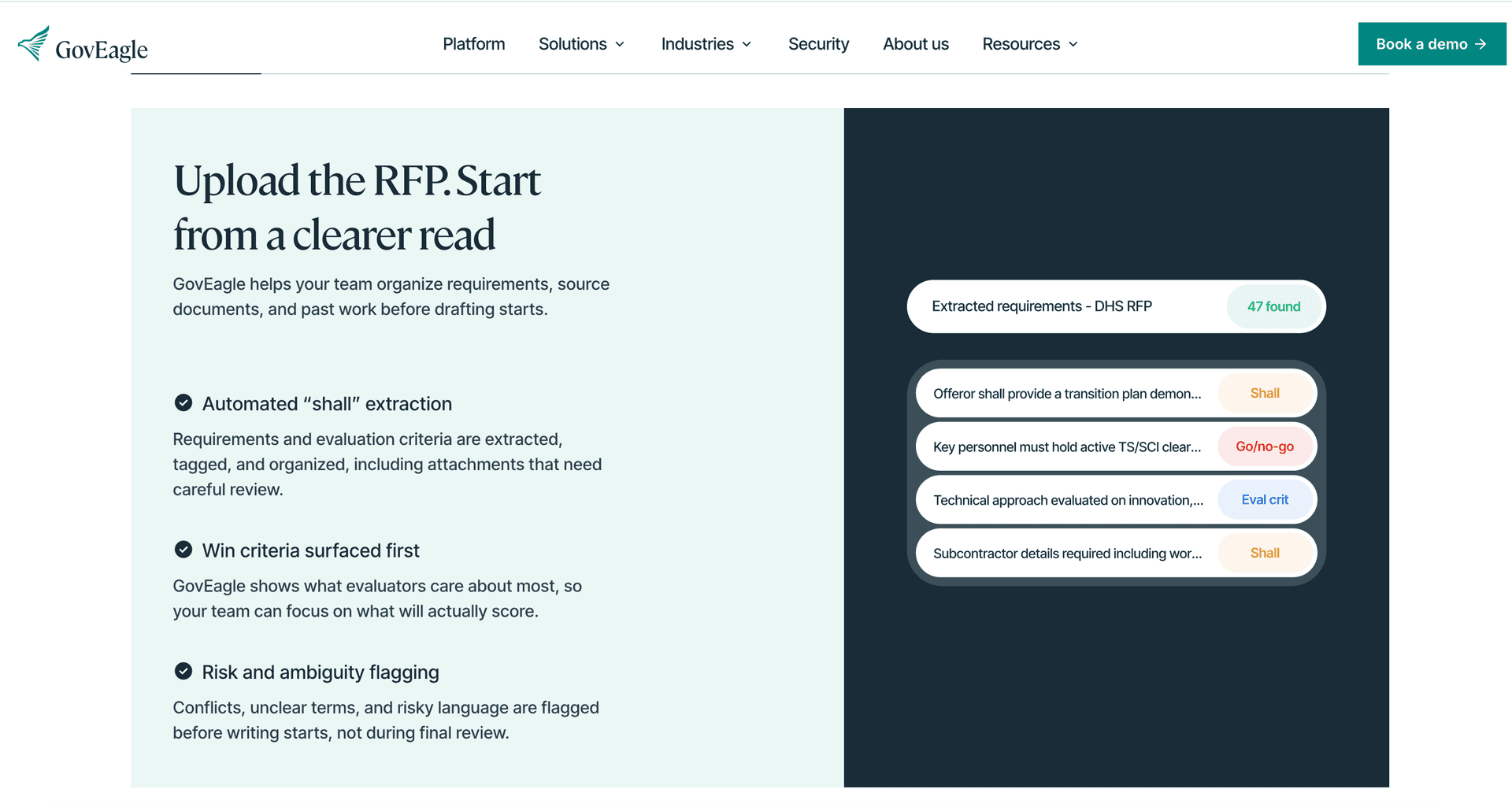
GovEagle outperforms Responsive for government contractors because we were built exclusively for federal proposal workflows. Responsive serves commercial RFP processes across industries, lacking the specialized features that government contracting demands.
We work inside Microsoft Word, Excel, and PowerPoint through native add-ins. You draft proposals in Word using your existing templates without exporting content or switching between interfaces. Responsive requires web-based workflows that force teams out of their standard authoring environments.
Our compliance matrix generation automatically shreds RFPs and creates full Excel matrices matching industry formats. Responsive has no comparable capability. We track amendments, automate capture planning, perform gap analysis, and identify teaming partners across the full proposal lifecycle. Responsive focuses only on response assembly.
We support FedRAMP Moderate Equivalency with GCC/GCC High deployment options and air-gapped environments. Responsive does not publicly list FedRAMP Moderate authorization or GCC High deployment options.
According to customer-reported case studies, Chevo achieved 30-40% time savings on RFIs and IDS accelerated proposal prep 3-4x while working with CUI data. Government contractors need purpose-built tools, not adapted commercial software.
FAQs
Why do government contractors look for alternatives to Responsive?
Government contractors typically seek alternatives because Responsive lacks native Microsoft Office integration, automated compliance matrix generation in Excel, and FedRAMP certifications. Teams also report that the tool's web-based workflow forces them out of Word, Excel, and PowerPoint where proposal work traditionally happens, creating friction in federal contracting processes.
When should you consider switching from Responsive to a government-focused tool?
Consider switching when you're handling compliance-intensive federal RFPs that require detailed compliance matrices, amendment tracking, or capture planning workflows. If your organization works with CUI data requiring FedRAMP Moderate Equivalency or needs to integrate with SharePoint and Microsoft Office environments, a purpose-built government contracting tool will reduce manual workarounds.
What features should you focus on when comparing Responsive alternatives?
Focus on native Microsoft Office integration (Word, Excel, PowerPoint add-ins), automated compliance matrix generation in Excel format, amendment tracking capabilities, and FedRAMP Moderate Equivalency or higher certifications. Also assess whether the tool includes capture module functionality, gap analysis, and teaming partner identification for the full proposal lifecycle.
Final Thoughts on Selecting Your Proposal Tool
Commercial RFP software forces government contractors into workarounds that waste time during critical proposal cycles and create risk when managing strict federal requirements. When assessing Responsive alternatives, it becomes clear that federal teams need more than a web-based content library. They need automated Excel compliance matrices, amendment tracking tied directly to requirements, capture workflows that guide bid and no-bid decisions, and Microsoft Word, Excel, and PowerPoint add-ins that allow writers to stay inside familiar templates. GovEagle was built for this reality, supporting capture through submission inside native Microsoft Office environments while maintaining FedRAMP Moderate Equivalency. If your team is ready to reduce rework, limit manual matrix building, and gain full lifecycle visibility, learn more about GovEagle and see how purpose-built government proposal software changes the way federal contractors execute.