
Build a Compliance Matrix Right in Excel in September 2026

Akash Mandavilli
CEO and Co-Founder of GovEagle
About the author
Akash is a 2x founder with previous experience in AI from Meta and federal sales from IBM. Akash holds a dual-degree from Johns Hopkins University in Economics and Computer Science.
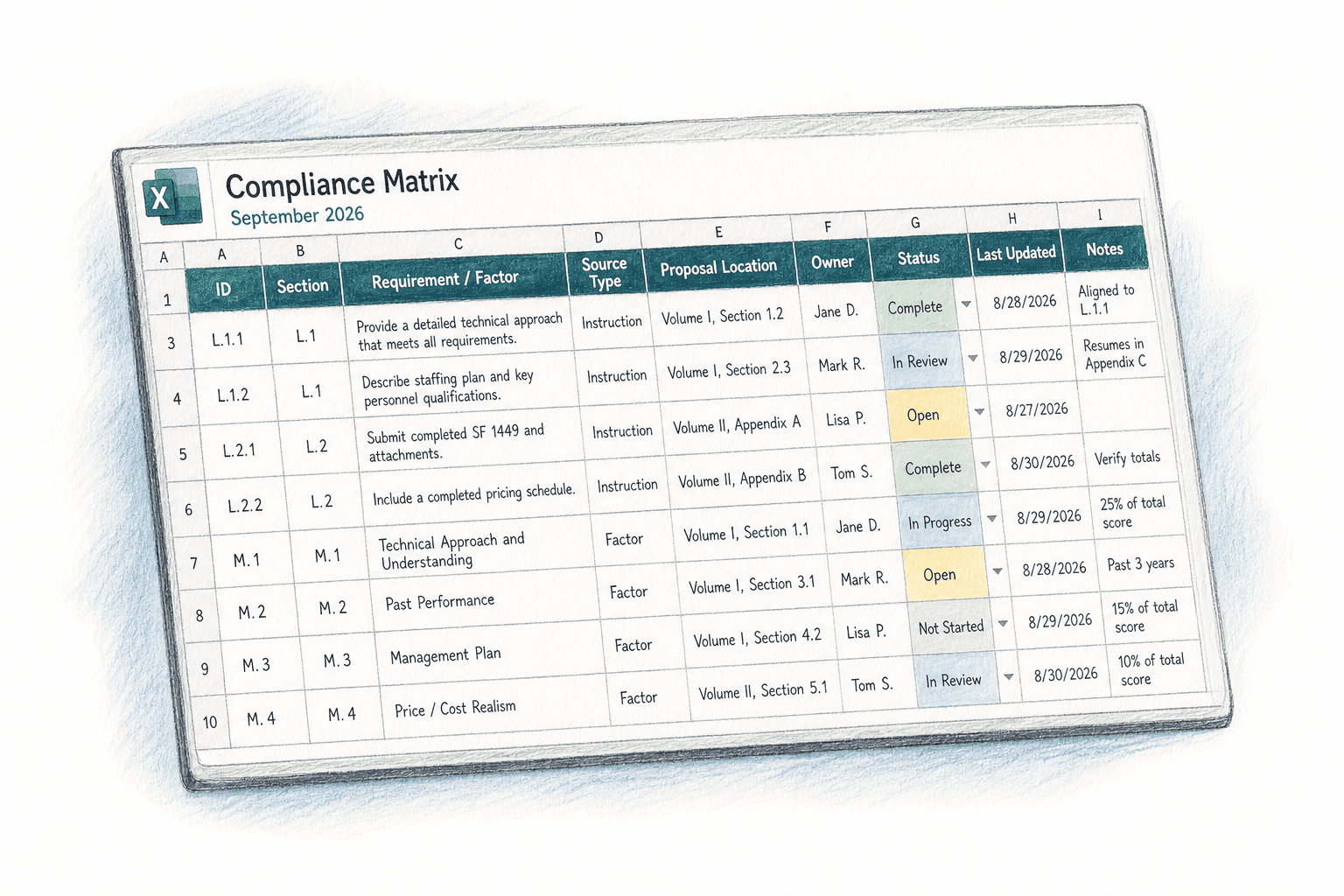
Most proposal teams build their compliance matrix schema once and carry it across every pursuit. The column logic, the status fields, the conditional formatting, it all transfers. What shouldn't transfer is the need to reconstruct all of that just because a tool generated output in the wrong format. There's a straightforward way to think about which tools actually slot into that workflow without adding a step.
TLDR:
- A compliance matrix maps every Section L and Section M requirement to a proposal location, owner, and status. A missed requirement can create evaluation exposure before technical approach is reviewed.
- Map both Section L instructions and Section M factors in your matrix; a proposal that follows instructions but ignores scoring factors often reads compliant on the surface and weak under evaluation.
- Four failure patterns account for most compliance gaps: stopping the shred at Section L, freezing the matrix after initial build, writer drift from the outlined structure, and no Section M column.
- When amendments arrive, revert every affected row to Open regardless of prior status. A requirement marked Complete against old solicitation language is only complete against the old solicitation.
- GovEagle parses Section L and Section M requirements from the RFP and generates the compliance matrix in Excel, preserving your existing schema, conditional formatting, and status logic without a reformatting step.
What a Compliance Matrix Is and Why It Governs Proposal Evaluation
A compliance matrix is a structured table that maps every requirement in a federal solicitation to the exact location in your proposal where it's covered, along with who owns it and whether it's been completed. In federal source selection, evaluators score proposals against documented Section L instructions and Section M evaluation criteria. When a requirement has no traceable response, it doesn't get partial credit.
Under FAR Part 15, source selection scores proposals against stated criteria. A single missed requirement can disqualify an otherwise competitive bid before pricing or technical approach ever gets reviewed. The compliance matrix is the mechanism that prevents that outcome, giving both your team and the scoring panel a clear line from solicitation requirement to proposal response.
Core Components of an Effective Compliance Matrix Template
Every functional compliance matrix template shares a common column set. The exact labels vary by firm, but the underlying fields don't.

| Column | Purpose |
|---|---|
| Requirement ID | Unique reference for tracking and cross-citing during reviews |
| Source Section | Identifies whether the requirement comes from Section C, L, or M |
| Requirement Text | Verbatim or paraphrased language from the solicitation |
| Proposal Response Location | Volume, section, and paragraph where the requirement is covered |
| Owner | The writer or SME responsible for that response |
| Compliance Status | Open, In Progress, or Complete |
| Risk Flag | Flags requirements with ambiguous language or partial coverage |
The risk flag column earns its place at Pink Team. Reviewers can filter for flagged rows and focus attention where gaps are most likely to surface during evaluation, instead of re-reading every row from scratch. Chevo, a federal management consulting firm, cut proposal prep time by 40% after integrating GovEagle into their compliance review workflow. That result reflects what structured matrix discipline, combined with the right tooling, actually delivers under deadline.
Why Excel Remains the Standard Format in Federal Contracting
Proposal managers can filter by risk flag, sort by Section L subsection, or isolate unowned rows in seconds. Conditional formatting turns a raw requirements list into a live status board without extra tooling. When Pink Team packages go out, the matrix exports to PDF with frozen headers and print areas already set. That workflow exists entirely within software every team member already has open.
The deeper reason is flexibility. Federal solicitations vary widely in structure, and every firm has its own column conventions, naming schemes, and formatting logic. Excel accommodates all of it without a schema change or a support ticket. When an amendment drops and rows need to shift, the matrix absorbs it. That adaptability is why the format has remained a proposal-team standard through successive changes in agency requirements and proposal methodologies.
How to Build a Compliance Matrix in Excel: A Step-by-Step Approach
Work through the source documents in a single folder before building anything: the base RFP, all attachments, Q&A releases, and every amendment issued to date. Missing one attachment is where requirements get dropped.
Pull requirements in this order:
- Section L (proposal instructions)
- Section M evaluation criteria
- Section C (statement of work or performance work statement)
- Attachments and exhibits
- Amendments last, so changes override base text
For each requirement, create one row with the pasted or paraphrased text, its source section, and a unique sequential ID. Once every requirement has a row, map it to a proposal volume and section. If a requirement touches multiple volumes, duplicate the row and note both locations. Flag ambiguous requirements immediately; don't wait for Pink Team to surface them.
Assign an owner to every row before the matrix leaves your hands. Unowned rows are the ones that surface as gaps at Red Team.
Set conditional formatting on the Status column so Open and flagged rows display in distinct colors. Filter views by owner let each writer see only their assigned rows without touching the shared file. Lock the header row and set print areas before sharing so the PDF export is clean on the first attempt.
Section L vs. Section M: Mapping Instructions to Evaluation Criteria
Section L defines what to write; Section M defines how it gets scored. A matrix that captures only one leaves the team writing to instructions without knowing which responses carry the most evaluation weight. For a detailed walkthrough, see our compliance matrix build guide.
The gap surfaces at Red Team: a section that follows every Section L instruction precisely but never maps to Section M factors reads as compliant on the surface and weak under scoring. Evaluators work from M. If your discriminators and capability evidence aren't tied to the factors driving point allocation, they may not register.
The fix is a two-column mapping approach inside the matrix. For each requirement row, one field captures the Section L instruction source and a second captures the corresponding Section M factor it's scored against. Where multiple instructions feed a single evaluation factor, or where a Section M factor has no corresponding Section L instruction, those rows get flagged for proposal manager review before drafting begins.
Common Compliance Matrix Mistakes That Disqualify Proposals
Four failure patterns account for most compliance-related disqualifications:
- Requirements buried in Section C attachments or exhibits never make it into the matrix because the shred stopped at Section L
- The matrix gets locked after initial build, so amendments and Q&A releases never update the row set
- Writers diverge from the outlined section structure mid-draft, breaking the response location references already logged in the matrix
- Section M factors have no corresponding column, so the team submits a proposal that follows instructions but doesn't map to what evaluators actually score
As Hinz Consulting notes, missing even a small requirement can disqualify an otherwise strong proposal. The matrix only protects against that outcome if it's treated as a live document, not a one-time artifact frozen at RFP release.
Get GovCon capture and proposal insights in your inbox.
How to Manage Compliance Matrix Updates When Amendments Arrive
When an amendment drops with 72 hours left before submission, the instinct is to scan the redlined pages and move on. That approach misses requirements that shifted quietly in Section C attachments or appeared in a Q&A release the team filed and forgot.

Work through the amendment systematically:
- Pull the full amendment package alongside the original RFP and compare section by section, including pages that don't look visibly changed.
- Log every added, removed, or reworded requirement as a distinct row change before any drafting resumes.
- Flag affected proposal sections for writer review so nothing gets revised against stale compliance language.
Row changes fall into three categories. New requirements get new rows with fresh IDs and unassigned owners. Deleted requirements get marked inactive instead of removed, so the audit trail stays intact if an evaluator questions a gap. Modified requirements get updated language in the Requirement Text field, with the prior version preserved in a comment.
Every row touched by the amendment should revert its Status to Open regardless of where it sat in the review cycle. A requirement marked Complete before the amendment is only complete against the old solicitation language.
How the Compliance Matrix Connects to Color Team Reviews
The matrix doesn't retire after the shred. At each color team gate, it becomes the reviewer's checklist.
Pink Team reviewers scan open rows against the draft's completion percentage, flagging any requirement without a corresponding outline section before writers commit to a structure that's already missing coverage. Red Team review goes deeper, confirming that each response actually satisfies the requirement and doesn't merely restate it. A row marked Complete that maps to a paragraph paraphrasing the requirement without satisfying it is a Red Team finding. Gold Team runs a final trace, confirming that no amendment-driven row changes were missed in the final volume.
Without the matrix, reviewers are comparing a draft to a 200-page solicitation from memory. With it, every gate reduces to a filtered view: open rows, flagged rows, owner conflicts. See our color team reviews playbook for how each gate works in practice. That filter is what keeps color team reviews from collapsing into line-by-line re-reads under deadline pressure.
Reusing and Adapting Your Compliance Matrix Template Across Pursuits
A well-designed column schema transfers across every pursuit. Status dropdowns, risk flag logic, conditional formatting, owner fields, and print areas get built once and carry forward without modification. The structural investment is front-loaded; the ongoing work is requirement population, not template reconstruction.
What must be rebuilt for each solicitation:
- Requirement text rows, since every RFP carries different language and section structure that cannot be reused verbatim.
- Response location mapping, because volume and section assignments follow the new proposal outline.
- Section M factor columns, as evaluation criteria vary by agency and contract type.
- Owner assignments, given that team composition changes across pursuits.
The compliance risk in reuse comes from one place: stale content carried forward that looks populated but references the wrong solicitation. A Status column showing rows as Complete from a prior bid, or a response location pointing to a section that no longer exists, creates false confidence at Pink Team review. Before populating any requirement text, clear every data row and reset every Status field to Open. The schema stays; the data does not.
Firms bidding across multiple agencies benefit from maintaining a master template with agency-specific tab variants that preserve known formatting preferences without rebuilding from scratch each time.
When Excel-Native Output Matters: The Tool-to-Template Fit Problem
Some compliance matrix automation tools generate compliance matrices inside their own web interface. To use that output, your team exports it, reformats columns to match your firm's schema, aligns numbering against your tracking system, and rebuilds the conditional formatting that drives your review workflow. That kind of reconstruction late in a proposal cycle carries real cost.
The tool-to-template fit problem is separate from whether extraction is accurate. A tool can parse an RFP correctly and still produce output that requires substantial rework before your team can use it. When your matrix schema, owner fields, and status logic already live in Excel, a tool that generates natively in Excel slots into that workflow without reconstruction. Your template stays intact. The output conforms to how you work.
How GovEagle Generates Excel-Native Compliance Matrices for Federal Proposals
GovEagle parses Section L and Section M requirements directly from the RFP and generates the compliance matrix in Excel. Your existing column schema, conditional formatting, and status logic stay intact, with no reformatting step, no schema reconciliation, and no rebuild of the review workflow your team already uses. If your firm is evaluating whether Excel-native matrix generation fits your pursuit workflow, Book a Demo to see how GovEagle outputs directly into your existing template. For a full look at how GovEagle supports the proposal lifecycle, see the proposals solutions page.
When amendments arrive, GovEagle automatically identifies changed requirements and updates the matrix, flagging affected rows for writer review instead of leaving that trace work to the proposal manager under deadline pressure. The annotated proposal outline in Word generates as a complementary output, mapping requirements to proposal sections before drafting begins. Both outputs feed directly into the color team workflow.
Chevo reported 30 to 40% time savings on RFIs and 15 to 25% time savings on RFPs after adopting GovEagle. UpdraftCo, a solo proposal consultant, delivered compliance packages 97% faster across multiple clients. Those results reflect what happens when the tool generates output your team can use without reconstruction.
Final Thoughts on the Compliance Matrix Template in Federal Proposal Work
The firms that win consistently treat the compliance matrix template as the backbone of the entire proposal cycle, not a pre-work checkbox. Map Section L to Section M, flag ambiguous rows early, and update every affected row when amendments arrive. That discipline is what separates proposals that score well from proposals that look compliant on the surface and fall apart under evaluation.
FAQ
How do you build a compliance matrix in Excel that stays current through amendments?
Build the matrix by pulling requirements in order: Section L first, then Section M, Section C, attachments, and amendments last so changes override base text. When an amendment drops, log every added, removed, or reworded requirement as a distinct row change before any drafting resumes, and reset the Status field on every touched row back to Open regardless of where it sat in the review cycle. Deleted requirements get marked inactive, not removed, so the audit trail stays intact.
What is the difference between Section L and Section M in a federal compliance matrix template?
Section L defines what to write; Section M defines how it gets scored by evaluators. A compliance matrix template that captures only Section L leaves writers following instructions without knowing which responses carry the most evaluation weight, so both should appear as separate mapped fields for each requirement row.
Can GovEagle generate a compliance matrix in my existing Excel template without reformatting?
Yes. GovEagle parses Section L and Section M requirements directly from the RFP and generates the compliance matrix in Excel, preserving your existing column schema, conditional formatting, and status logic without a reformatting or schema reconciliation step. When amendments arrive, GovEagle automatically identifies changed requirements and flags affected rows for writer review instead of leaving that trace work to the proposal manager under deadline pressure.
What compliance matrix mistakes most often disqualify federal proposals?
Four patterns account for most compliance-related disqualifications: requirements buried in Section C attachments that never make it into the matrix, matrices frozen at RFP release that never absorb amendments or Q&A releases, writers who diverge from the outlined section structure mid-draft and break the response location references already logged, and Section M factors with no corresponding column so the proposal follows instructions but never maps to what evaluators actually score.
GovEagle vs. GovDash for Excel-native compliance matrix generation?
GovEagle generates the compliance matrix directly in Excel, so your firm's existing column schema, owner fields, and conditional formatting carry forward without reconstruction. GovDash builds compliance matrices within its web interface, which means teams with highly customized Excel templates should test export compatibility before assuming the output slots into their review workflow without rework.