
GovEagle adds forwarded task order notices to Discover
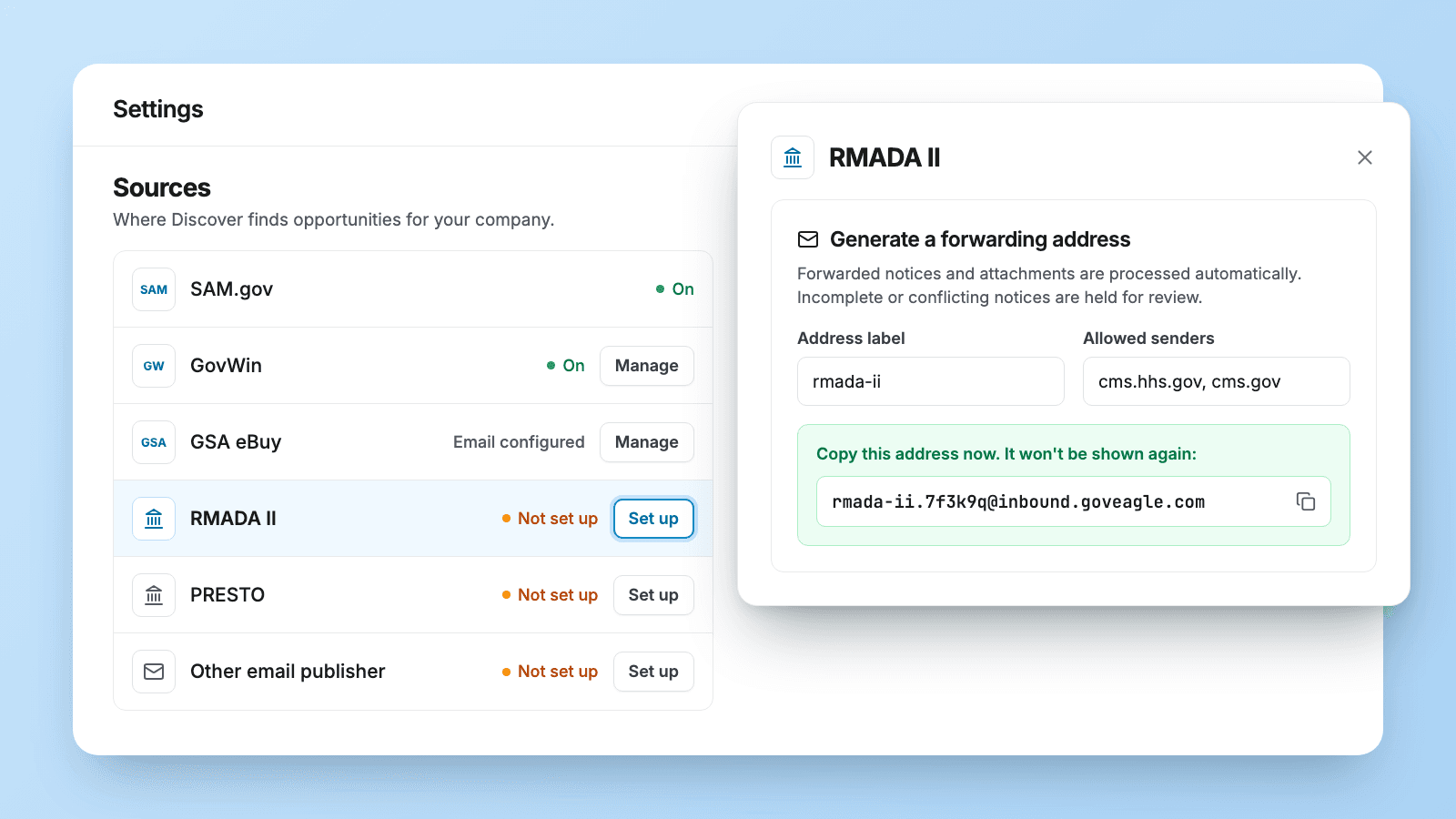
You can now forward task order notices from your contract vehicles to GovEagle. Each notice shows up in Discover with its attachments, scored like any other listing.
What changed
Many of the best opportunities never reach SAM.gov. They arrive as task order requests emailed to holders of a contract vehicle, and they're easy to lose in an inbox. Now:
- Built for your contract vehicles. GovEagle can now integrate with any GWAC or IDIQ through an email inbox. An admin generates the forwarding address under Settings → Discover → Sources.
- Attachments included. GovEagle reads the email and its attached documents to fill in the listing details.
- Scored for fit. The notice appears in Discover labeled with its source, scored against your company like every other match.
- Only the senders you trust. Each forwarding address accepts mail only from the senders or domains you list. Incomplete or conflicting notices are held for review instead of going straight into Discover.
Who it helps
Capture teams at firms that hold IDIQs and GWACs, where task order requests reach one person or a shared mailbox and the rest of the team hears about them late.
How forwarding works
- An admin opens Settings → Discover, finds the vehicle under Sources and clicks Set up.
- In Allowed senders, enter the agency's sending address or domain, and the mailbox that will forward the notices.
- Click Generate email address and copy it right away. It's shown only once.
- Forward notices to that address, or set a forwarding rule in your email so every notice goes there.
Get GovCon capture and proposal insights in your inbox.
Where it fits
Forwarded notices are part of Discover in GovEagle's capture workspace. From Discover, add a notice to your pipeline like any other listing. For finding the vehicles worth holding, read how to find task order opportunities under IDIQ contracts.
What it doesn't do
- Documents need to be attached. GovEagle reads the email and its attachments, so attach the files you want on the listing.
- Unlisted senders are rejected. GovEagle checks the address that sent it the email. The forwarding mailbox has to be on the list, even when the original agency sender is.
- A lost address can't be recovered. Revoke it and generate a new one.
Get started
Forwarded notices are part of Discover, which is in beta. To get started, email support@goveagle.com.
How forwarding works → Forwarding contract vehicle notices into Discover
See it on your own vehicles → Book a demo