
Access Control and SharePoint Permissions for GovCon Proposal Teams

Akash Mandavilli
CEO and Co-Founder of GovEagle
About the author
Akash is a 2x founder with previous experience in AI from Meta and federal sales from IBM. Akash holds a dual-degree from Johns Hopkins University in Economics and Computer Science.
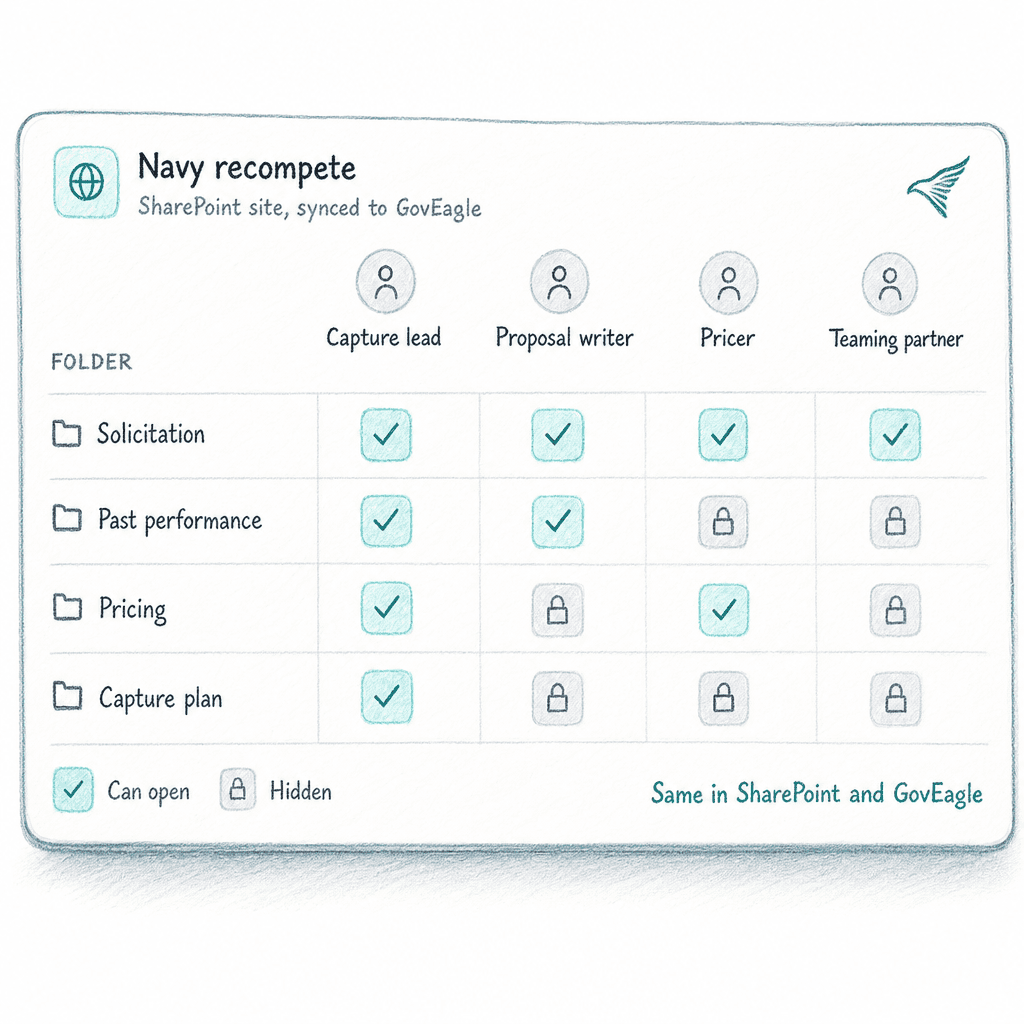
Most proposal teams set permissions once at the start of a pursuit and revisit them only when something breaks. The problem is that by then, a teaming partner SME who wrapped their section two months ago still has edit rights on an active volume, and your IT admin can browse the black hat slides without anyone noticing.
TLDR:
- Blanket "proposal team" access puts price-to-win data, black hat slides, and CUI in front of everyone who has a seat.
- NIST SP 800-171 requirement 3.1.5 calls for least privilege on systems that handle CUI, and FAR Subpart 9.5 OCI mitigation plans can require firewalls around conflicted staff and files.
- Groups scoped to specific pursuits revoke access in one membership change, closing the orphaned-access gap that individual folder sharing leaves open.
- Make new opportunities private by default, and limit CRM-synced ones to a named pursuit group, so pricing and competitive intelligence stay with the pursuit team.
- GovEagle is FedRAMP Certified (Moderate) and offers roles, groups, and access controls on each opportunity, plus an IT Admin role that manages users and SSO without content permissions.
Why Access Control Matters in Federal Proposal Work
Federal proposal teams face access control pressures that go beyond general IT hygiene. In GovCon, they are obligations tied to regulation, contract eligibility, and competitive position. That includes the black hat analysis that feeds recompete capture planning, which must stay tightly scoped to the core team.
NIST SP 800-171 requirement 3.1.5 (Rev. 2) says to "employ the principle of least privilege, including for specific security functions and privileged accounts," meaning users should hold only the access their assigned work requires. When a contract brings your proposal environment into scope for CUI, this applies directly to how your team provisions access to solicitation files, past performance libraries, and draft volumes.
FAR Subpart 9.5 adds a second layer. If your firm's work on another government contract gives it nonpublic information or a conflicting role, the contracting officer can require you to avoid, neutralize, or mitigate that Organizational Conflict of Interest. Mitigation plans can include firewalls that keep conflicted staff and files away from the proposal team, and open, shared permissions make that firewall hard to prove.
The third pressure is practical. Most active proposals involve teaming partners, subcontractor SMEs, and outside consultants who need access to specific sections and no others. A writer brought in for the technical volume has no business opening the cost volume or past performance attachments. When access is managed through shared folders or blanket site permissions, that boundary collapses by default.
Granular vs. Broad Access Control
Broad access models assign permissions at the category level: proposal team members get read access, managers get edit access, admins get full control. Simple to configure and genuinely adequate for low-stakes environments.
Federal proposal work rarely qualifies. A single pursuit folder might hold a price-to-win analysis, a black hat assessment built from competitive intelligence, CUI attachments limited to authorized staff, and a cost volume only the contracts lead and finance reviewer should touch. Blanket "proposal team" read access puts all of it in front of everyone.
Granular access control scopes permissions to specific resources, specific actions, and specific users, particularly where pursuit content falls under CUI compliance obligations. A subcontractor SME writing Section 3.2 gets edit rights on that folder and nothing else. A pricing analyst gets read access to the PWS and cost volume only. The black hat slides stay invisible to anyone outside the core capture team.
The distinction matters most when a pursuit spans multiple teaming partners, cleared and uncleared personnel, or parallel volumes with different handling requirements. Granular models keep permissions scoped to what the work requires.
The Building Blocks: RBAC, ABAC, and Least Privilege
Two models and one principle come up in most access control discussions: role-based access control (RBAC), attribute-based access control (ABAC), and least privilege. Proposal environments usually draw on all three.
RBAC assigns permissions to roles instead of individuals. It is one piece of a broader identity, credential, and access management strategy. A "Technical Writer" role gets edit rights on technical volumes; a "Contracts Reviewer" role gets read access to Section L and the compliance matrix. When someone joins the pursuit, you assign them a role and they inherit the correct permission set. That keeps access predictable and easy to audit as the team grows.
ABAC goes further by checking live attributes at access time: clearance level, project membership, division, even time of day. A user might hold a Technical Writer role but still be blocked from a CUI folder until an attribute such as completed CUI training is confirmed. This model handles split-team pursuits where two teaming partners share a SharePoint environment but need hard boundaries between their respective volume workspaces.
Least privilege sits underneath both, whether you run pure RBAC or layer ABAC conditions on top. NIST's discussion of requirement 3.1.5 sets the goal of privileges "no higher than necessary to accomplish required organizational missions or business functions."
Many proposal teams start with RBAC because it mirrors roles they already use on pursuits: Capture Lead, Volume Owner, Red Team Reviewer. ABAC conditions get layered in for CUI-scoped folders, black hat content, or cost volumes requiring an additional attribute check before access opens.
Roles and Permissions in a Proposal Tool
Generic IT permission models run three tiers: read, write, admin. Proposal environments need more precision, because the person configuring your SSO and managing integrations should not see the black hat slides from last quarter's pursuit.
GovEagle uses four built-in roles:
- User: proposal writers and capture managers working on the opportunities shared with them or with the whole organization.
- Content Manager: a User who can also add and edit content library material.
- Admin: proposal or operations leads who manage organization settings and see every opportunity shared with the whole organization.
- IT Admin: manages users, roles, groups, SSO, and integrations, with no content, opportunity, or AI permissions. It is usually paired with an unlicensed seat.
When the person provisioning accounts and configuring your identity provider can also browse active proposal content, you've created an access path that bypasses every content-level permission you've set. Separating IT administration from content access narrows that path without restricting the IT team's ability to manage the environment.
| Role | Opportunity Access | Content Library | AI Chat Access | License Required |
|---|---|---|---|---|
| User | Edit on org-wide; others as shared | Read (as granted) | Yes | Yes |
| Content Manager | Edit on org-wide; others as shared | Read + Write | Yes | Yes |
| Admin | All org-wide, plus org settings | Full, except others' personal folders | Yes | Yes |
| IT Admin | None | None | None | No (usually unlicensed) |
Custom roles can draw from any combination of permissions, so teams with unusual structures don't have to force contributors into a tier that doesn't fit.
Groups: Sharing Access at the Team Level
Individual role assignments handle the "who gets what" question. Groups answer the next question: how to manage access at pursuit scale without rebuilding permissions every time the team changes.
A group is a named set of users you can share opportunities and content folders with. When a new writer joins the technical volume team, adding them to the Technical Volume group propagates access to every resource that group touches. When a consultant's engagement ends, removing them from the volume group revokes access across the board, without anyone manually hunting down the six folders they were added to individually over a 10-week pursuit.
The orphaned access problem is where broad individual sharing tends to fail. A consultant finishes their section and rotates off. Six months later, that consultant still has edit rights on an active proposal because permissions were set on the folder directly and no one ran a cleanup pass. Groups close that gap.
Pursuit teams tend to organize groups by role and by volume, a structure that pairs well with SharePoint UX best practices for teams managing shared folders. Volume writers go into a group scoped to their volume only. Red Team reviewers go into a group covering all volumes for review access. Neither group can see the other's workspace by default.
Opportunity and Folder Sharing
Within the resource layer, three access tiers govern what each member can do: view-only, edit, and owner. View-only fits Red Team reviewers and anyone whose role is to read without modifying files. Edit access goes to active contributors. In GovEagle, each opportunity can have one owner, who receives incoming access requests. That gives the access list a named point of accountability, so no one assumes someone else reviewed it.
One design choice carries outsized weight: whether new opportunities are private or open by default. When the default is open, every pursuit created through a CRM integration lands visible across the organization before the pursuit lead has configured permissions. A pricing analysis attached during capture becomes readable by anyone with a seat. Private-by-default inverts that: access requires a deliberate grant. In GovEagle, new opportunities are shared with the whole organization unless you change the default sharing setting, and Salesforce-synced opportunities can be limited to a group you choose.
The same logic applies to content library folders. A past performance library may contain attachments from contracts with handling restrictions. Read-only sharing at the folder level lets writers pull relevant content without opening write access to source documents that feed multiple pursuits simultaneously. Files uploaded during an AI chat session default to a private personal folder, keeping exploratory drafts or competitive notes out of shared spaces until the user actively moves them.
Get GovCon capture and proposal insights in your inbox.
SharePoint Permission Inheritance
When GovEagle connects to SharePoint via its SharePoint integration, teams choose between two operating modes: GovEagle-managed permissions or SharePoint-inherited permissions.
In inherited mode, SharePoint stays the system of record. Each user sees only the connected content they already have access to in SharePoint, so no parallel permission structure is needed inside the proposal tool. Inherited mode requires users to sign in with Microsoft Entra ID. As the apps4.pro SharePoint governance guide notes, permissions that grow faster than governance can create drift where nobody is sure who can see what. Inherited mode prevents that by keeping a single source of truth.
One constraint follows: folders under SharePoint permission sync cannot be shared manually within the proposal tool. That closes the workaround path where a user grants individual access inside the proposal tool to content they lack rights to in SharePoint.
For IT teams configuring the GovEagle SharePoint integration, two scoping options are available. Connecting all sites lets GovEagle sync any SharePoint site. Sites.Selected limits GovEagle to the sites IT approves, the right choice when your tenant holds content outside the proposal team's scope. GovEagle's Office add-in and SharePoint sync work with Microsoft 365 GCC and GCC High tenants.
Security Frameworks and Access Control Obligations
Access control obligations for proposal tooling come from several frameworks, each with its own trigger.
NIST SP 800-171 sets the baseline for systems that process, store, or transmit CUI when a contract requires it, as DFARS 252.204-7012 does for Department of War (DoW) contractors. Those contracts and CMMC still assess against Rev. 2, which requires limiting system access to authorized users, limiting the transactions they can run, and least privilege. Rev. 3, published in May 2024, regroups the requirements into 17 families. For more, see our post on NIST 800-171 and AI tools.
For DoW contractors, FedRAMP comes in when a cloud tool stores, processes, or transmits covered defense information: DFARS 252.204-7012 requires the provider to meet the FedRAMP Moderate baseline or its equivalent.
CMMC adds a third layer. If your contracts require CMMC Level 2, a cloud AI tool that handles CUI falls inside that scope. On July 13, 2026, the DoW CIO suspended the CMMC Phase 2 transition, putting required C3PAO assessments on hold. A 60-day Reform Task Force review followed, and DoW had not announced a date to resume Phase 2 by late October 2026. Self-assessments still apply where contracts require them, and DFARS 252.204-7012 still requires NIST SP 800-171 Rev. 2. The audit timeline is on hold, but the access control obligation is not.
Practical Setup Guide for a Mid-Sized GovCon
Start every new hire at the base User role. Escalating access requires a deliberate grant; downgrading it after the fact rarely happens on schedule. Default-low slows permission accumulation across pursuits, and periodic reviews catch the rest.
There are four other decisions worth locking in before a pursuit goes active.
- Set private-by-default on any pursuit touching recompete intelligence, sole-source positioning, or CUI-adjacent content. When a new opportunity lands from a CRM sync, it should go only to the pursuit group until the owner sets access. Open-by-default turns every unreviewed sync into a potential exposure.
- Build groups around pursuit teams, not org-chart units. A "Proposals" group mirroring your department structure will eventually contain someone who rotated off an active pursuit months ago. A group scoped to a specific pursuit revokes cleanly when the work ends.
- Place your IT Admin on an unlicensed seat. The person managing SSO and integrations should have zero visibility into opportunity content, the content library, or AI sessions. Paired with an unlicensed seat, the IT Admin role keeps routine account work separate from proposal content. Review role assignments on a schedule, since anyone who can manage roles can change them.
- Choose SharePoint-inherited permissions only when your existing SharePoint governance is well maintained. One system of record is easier to audit than two. If permissions have drifted, clean that up first before inheriting a structure nobody trusts.
How GovEagle Supports Granular Access Control for Proposal Teams
GovEagle is FedRAMP Certified (Moderate) through Knox Systems and can handle Controlled Unclassified Information (CUI). Inside it, built-in and custom roles, user groups, and access controls on each opportunity let you scope access to the pursuit, and content library search results are filtered by each user's permissions.
The IT Admin role manages users, roles, groups, SSO, and integrations, carries no content, opportunity, or AI permissions, and is usually paired with an unlicensed seat. Routine account and SSO work then doesn't come with access to proposal content, which follows the least-privilege principle in NIST SP 800-171 requirement 3.1.5.
On the SharePoint side, document access in GovEagle can follow existing SharePoint permissions when users sign in with Microsoft Entra ID, so each user sees only the synced content they can already open in SharePoint. Sites.Selected limits GovEagle to the sites IT approves, and the Office add-in and SharePoint sync work with Microsoft 365 GCC and GCC High tenants. Integrity Defense Solutions, a defense contractor that chose GovEagle partly because other tools lacked reliable GCC/GCC High and SharePoint support, now reports 3-4x faster preparation time, with most RFI drafts done in a day instead of almost two weeks.
Book a Demo to see how it maps to your SharePoint setup.
Final Thoughts on Granular Access Control for GovCon Proposal Work
Most access control failures in proposal environments build up slowly: a teaming partner who still has edit rights six months after their section was submitted, a pricing analysis visible to every seat on a shared folder, an IT admin who can browse active opportunity content while provisioning accounts. Granular control, built around specific roles, pursuit-scoped groups, and private defaults, prevents that buildup without depending on a cleanup pass that rarely happens on schedule.
FAQ
What is granular access control in a federal proposal environment, and why does it matter more than standard IT permission models?
Granular access control scopes permissions to specific resources, specific actions, and specific users, not broad read or edit rights assigned to everyone on the proposal team. In federal pursuit work, a single opportunity folder can hold CUI attachments, a price-to-win analysis, black hat competitive intelligence, and a cost volume that only the contracts lead should open; a blanket "proposal team" read grant puts all of it in front of everyone, which can break NIST SP 800-171 least privilege when CUI is involved and can undercut an OCI firewall under FAR Subpart 9.5.
How does role-based access control differ from attribute-based access control for GovCon proposal teams handling CUI?
Role-based access control assigns permissions to defined roles (Technical Writer, Contracts Reviewer, Red Team Reviewer) so a new pursuit member inherits the right access set the moment they are assigned a role, making the model auditable and manageable at scale. Attribute-based access control layers context-driven conditions on top: a user may hold a Technical Writer role but still be blocked from a CUI folder until an attribute such as completed CUI training is confirmed at access time. Many proposal teams start with RBAC because it mirrors roles they already use on pursuits, then add ABAC conditions for CUI-scoped folders, black hat content, or cost volumes that require an additional attribute check before access opens.
Should I use GovEagle-managed permissions or SharePoint-inherited permissions for a proposal environment that already has a mature SharePoint governance structure?
Use SharePoint-inherited permissions when your existing SharePoint governance is well maintained and you want a single system of record. In inherited mode, users see only content they already have rights to in SharePoint, and the workaround path where someone grants access inside the proposal tool to content they lack rights to in SharePoint is closed by design. If permissions in your tenant have drifted, clean that up before inheriting the structure; pulling a poorly governed SharePoint permission set into a proposal tool copies the drift into the proposal tool. GovEagle's Office add-in and SharePoint sync work with Microsoft 365 GCC and GCC High tenants.
What's the best way to prevent orphaned access from accumulating across pursuits in a GovCon proposal tool?
Build groups around individual pursuits, not org-chart units, and set new opportunities to private by default. Pursuit-scoped groups revoke access in a single membership change; a "Proposals" department group, by contrast, keeps contributors who rotated off months ago because no one removes them. Private-by-default compounds the benefit: new opportunities stay with their creator until access is granted, and CRM-synced ones go only to a named pursuit group, so pricing data and competitive intelligence stay with the pursuit team.
How does GovEagle's IT Admin role support least-privilege requirements under NIST SP 800-171 for proposal teams?
GovEagle's IT Admin role manages users, roles, groups, SSO, and integrations, carries no content, opportunity, or AI permissions, and is usually paired with an unlicensed seat. Routine account and SSO work then doesn't come with access to opportunities, the content library, or AI chat sessions, which follows the least-privilege principle in NIST SP 800-171 requirement 3.1.5. Review role assignments on a schedule, since anyone who can manage roles can change them.