
GovEagle Federal Proposal Features Explained (2026)

Akash Mandavilli
CEO and Co-Founder of GovEagle
About the author
Akash is a 2x founder with previous experience in AI from Meta and federal sales from IBM. Akash holds a dual-degree from Johns Hopkins University in Economics and Computer Science.
GovEagle is not affiliated with, sponsored by, certified by, or otherwise associated with Shipley Associates.
Your capture team gathered solid intelligence. Your BD lead built the win themes. Then the RFP dropped, and half of that context didn't make it into the proposal workspace. That usually happens because capture and proposal work live in different tools. Here's how purpose-built federal proposal features are designed to keep that from happening across every stage of the pursuit.
TLDR:
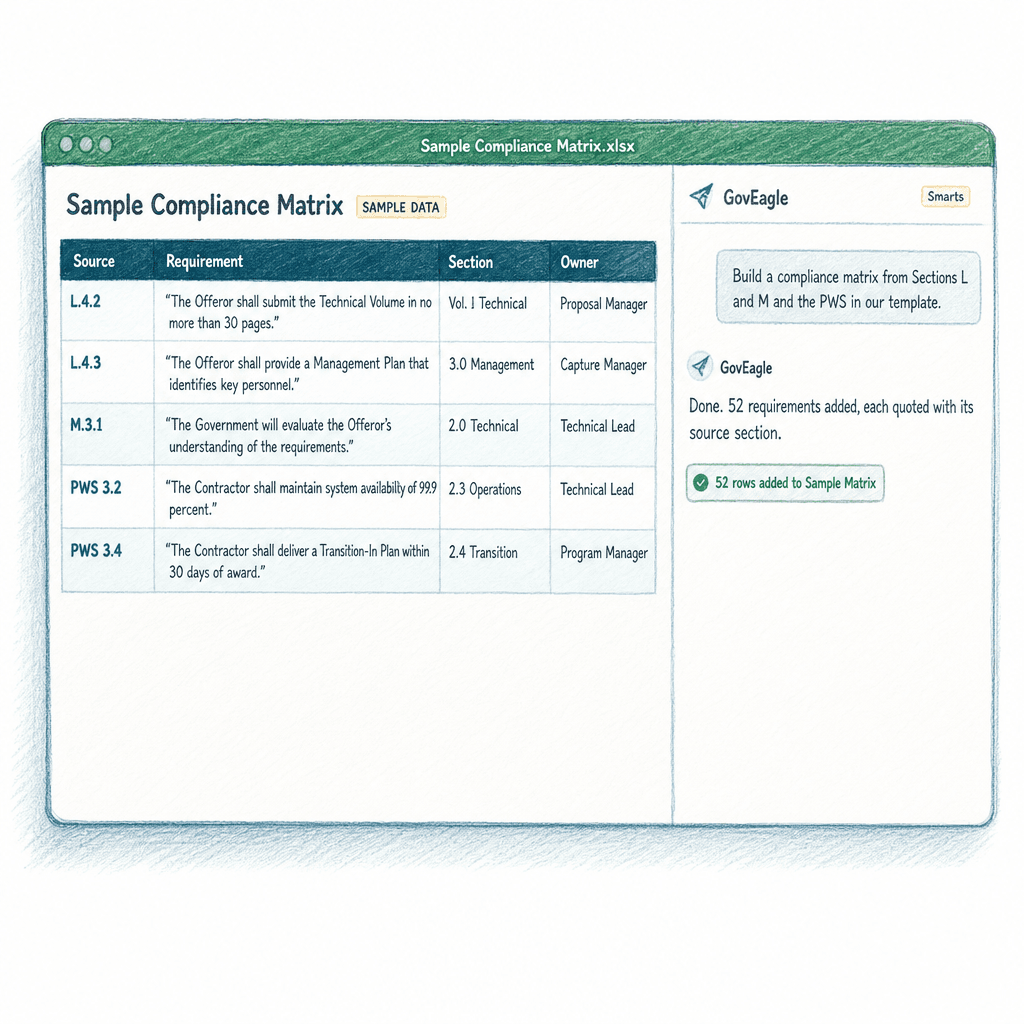
- Purpose-built federal proposal tools turn Sections L and M and the PWS into a compliance matrix, quoting each requirement with its source, before drafting begins.
- AI-assisted drafting saves the most time when it draws from your own content library and win themes, not generic training data.
- Color team review automation rates compliance and scores compellingness against Section L, M, and PWS requirements.
- Semantic search covers content synced from SharePoint and Google Drive, surfacing relevant past performance by meaning even when terminology differs.
- GovEagle covers the pursuit from bid/no-bid qualification through color team reviews, and is FedRAMP Certified (Moderate).
What Federal Proposal Features Actually Do for GovCon Teams
Many competitive federal RFPs, especially full and open source selections, follow FAR Part 15 negotiated procedures, where agencies score offers against Section L instructions and Section M evaluation factors (FAR 15.109-4 under the FAR Overhaul deviation, formerly 15.204-5). Task order and GSA Schedule requests often borrow the same structure even when they aren't required to. A missed requirement or misaligned section can cost the award before a reviewer reaches your technical approach.
General-purpose writing tools can draft prose, but they aren't built to shred an RFP, generate a Section L/M compliance matrix, or trace every requirement back to its source. Purpose-built federal proposal features are designed for those tasks.
Across a well-designed system, these features compress and de-risk each pursuit stage: qualifying opportunities before committing resources, pulling capture intelligence into the proposal workspace, generating compliance matrices in Excel, producing annotated outlines in Word, drafting first-pass content from your own content library, and running color team reviews against documented requirements. Each stage connects to the next, so intelligence gathered during capture reaches the proposal team in a usable format instead of staying buried in CRM notes. Chevo, a federal Mission Support Services contractor working 2 to 5 day RFI turnarounds, cut prep time 30 to 40 percent on RFIs and 15 to 25 percent on RFPs after adopting GovEagle, with full team adoption in one week.
The sections below cover each of those stages as built into GovEagle.
Opportunity Identification and Pipeline Qualification
GovEagle brings opportunities in from the places BD teams already work. Opportunities sync from Salesforce every 10 minutes, including TechnoMile GovSuite, which runs on Salesforce. Teams can paste a SAM.gov link to add an opportunity, and, on request, connect GovWin IQ with their own credentials to pull in the opportunities they track, or forward GSA eBuy notices so the RFQ details and documents arrive as GovEagle opportunities.
GovEagle's opportunity search pulls new SAM.gov and DoD PIEE solicitations daily, filters them by NAICS, PSC, set-aside, and agency, and suggests likely incumbents from USASpending award data. The agent can also look up SAM.gov notices, entity registrations, and USASpending award history in chat. Pipeline development stays connected to pursuit, not siloed in a separate tool.
GovEagle's bid/no-bid analysis then checks each opportunity against certifications, contract type, capability fit, the incumbent and competitors, and red flags, and gives a pursue recommendation before any writing begins.
Its capability gap analysis scores your past performance from 1 to 5 against each PWS or SOW requirement and shows where teaming may be needed.
Many teams also set a minimum PWin and a minimum number of directly relevant past performance references, often driven by what the solicitation requires, and cut pursuits that fall short before committing proposal resources. The ones that pass move forward with the cited analysis already attached to the opportunity.
Capture Intelligence and Competitive Analysis
Capture features solve a workflow problem: the intelligence collected during BD rarely reaches the proposal team in a usable format. Win themes, competitive positioning, and relationship context tend to live in Salesforce notes or personal files, then go missing when the RFP drops.
GovEagle's CRM integrations with Salesforce and HubSpot pull opportunity data and capture notes into the proposal workspace. Win themes are stored on each opportunity, where GovEagle's agent can create and update them, and they feed into its drafting. Capture teams retain judgment on which themes make it into the proposal, but the context travels with the pursuit without requiring manual re-entry.
Black hat analysis workflows guide teams through assessing how each key competitor would likely position itself, what win themes they would advance, and where their past performance creates vulnerabilities.
That output feeds directly into ghosting decisions and proposal strategy. The price-to-win workflow runs in parallel, using SAM.gov, USASpending, and web sources to produce a target price, competitor labor rate builds, and a sensitivity analysis, with every figure sourced, before the cost volume is written.
Compliance Matrix Generation
GovEagle generates a compliance matrix from Sections L and M and the PWS or SOW (often Section C), quoting each requirement word for word with its source, before a single word is drafted. For how those sections fit together, see our FAR Part 15 RFP guide.
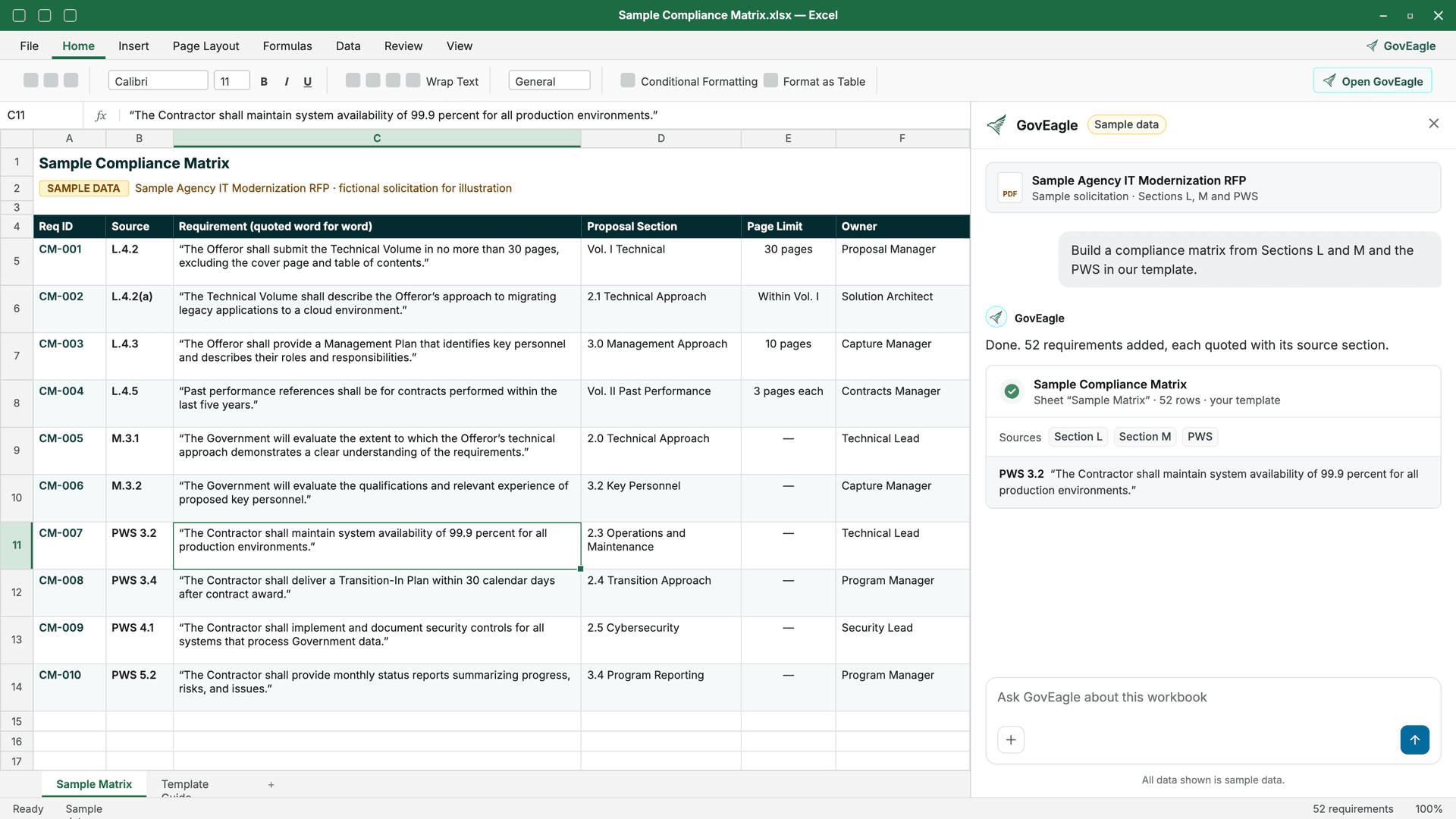
The output goes directly to Excel. Most proposal teams already work in Excel for compliance matrices, with custom templates and color-coding built in. GovEagle generates the matrix natively in Excel and can fill your organization's own template, so existing templates and color-coding carry forward.
Section I FAR clauses aren't part of the generated matrix, so teams add any clause rows they need by hand. Requirements from the PWS, Section L, and Section M are quoted word for word, split into separate rows, and cited to their source.
Teams still hand-building Section L and M matrices line by line can watch GovEagle build an Excel matrix from a live RFP: Book a Demo.
Annotated Proposal Outline and Storyboarding
GovEagle generates the annotated proposal outline directly in Microsoft Word, mapping every Section L instruction and Section M evaluation criterion to the corresponding proposal section before writers touch a blank page. The structure is compliance-mapped from the start, not retrofitted after drafting.
Each section lists the Section L instructions, Section M criteria, and PWS tasks it must answer, quoted word for word, with page limits and solicitation citations. Writers enter the drafting phase with a requirement-mapped skeleton already in place, which reduces the risk of structural omissions that surface at Red Team.
This stage aligns with Shipley storyboarding conventions, functioning as the structural handoff where win themes, evaluation criteria, and response strategy come together into a document writers can act on. Proposal managers can then assign each section as a task, with an owner and due date, in GovEagle's web app.
AI-Assisted First Draft Generation (Pink Team Draft)
How much time AI-assisted drafting saves depends on what the AI draws from. Output from a general-purpose model trained on public text tends to miss the past performance, technical differentiators, and agency context that evaluators look for.
GovEagle drafts proposal sections, executive summaries, and past performance narratives from the contractor's own content library instead of generic language, and draws on the win themes saved on the opportunity. Drafts cite the library documents they draw on, so writers can trace reused content back to its source.
The output is a first draft ready for Pink Team. Color team reviewers get something substantive to score against the compliance matrix instead of a blank slate.
Color Team Review Automation and Quality Checks
Red Team is usually the last full review with enough time left to fix structural problems. Its job is to read the draft the way evaluators will, against Section M, and catch any factor the draft doesn't clearly answer.
GovEagle's proposal review rates a draft's compliance against every Section L, M, and PWS requirement and scores how compelling the writing is, for Pink, Red, Gold, or White Glove reviews. A review can also focus on win themes and one-voice consistency, and it can use the compliance matrix as its requirements source, flagging sections where evaluation criteria are missing or thin before a human reviewer catches them. Chevo uses GovEagle for compliance reviews and has it act like a contracting officer evaluation committee. As Chevo puts it, "it's going to be harsh on you, which it should be."
The review gives proposal managers a structured list of weaknesses tied to specific requirements and Section M evaluation factors. That helps Red Team reviewers spend their time on the gaps most likely to cost points.
Human reviewers still own the judgment calls. Automated compliance checking surfaces where requirements are missing or thin; it does not resolve strategy or narrative quality. Treat the generated report as a structured input to the review, not a replacement for it.
Get GovCon capture and proposal insights in your inbox.
Knowledge Management and Semantic Content Retrieval
Reusable content exists in most proposal shops, but finding it in time to use it is difficult.
GovEagle's semantic search covers past proposals, capability statements, resumes, and boilerplate stored in SharePoint and Google Drive, syncing them into a searchable content library without a manual migration. SharePoint syncs in near real time and can follow your existing SharePoint permissions.
The search works on meaning, not keywords. A query for "zero-trust network architecture for a civilian agency" surfaces relevant past performance even when the original document uses different phrasing. For teams responding to a new agency or task area, that distinction matters, since the content they need often exists under terminology that doesn't match the new RFP's language.
The AI chat interface lets writers ask questions the way they'd ask a colleague. Responses cite the source document, so writers can verify the passage before using it. That citation layer keeps institutional knowledge accessible and makes every reused passage checkable before it goes into compliance-sensitive content.
Microsoft Office Integration and Workflow Compatibility
Most federal proposal work happens in Microsoft Office: drafts in Word, compliance matrices in Excel, and oral presentation decks in PowerPoint. Tools that make teams copy content in and out of a separate interface add steps right when deadlines are tightest.
GovEagle's Word add-in lets writers draft and rewrite text, search the content library, insert content through the chat, and ask the agent to check a section against the solicitation's requirements without leaving the document. Formatting stays intact, and Track Changes is optional for agent edits. Teams with existing proposal templates carry them forward without reformatting.
The Excel add-in lets the agent read, edit, format, and restructure sheets, from compliance matrices to pricing worksheets. Integrity Defense Solutions used it to build a rough order of magnitude estimate, get it approved, and submit it within a single day.
In PowerPoint, the agent can insert slides, edit text and tables, and build process and timeline diagrams in your organization's own template, so oral presentation decks draw on the same source material as the written proposal. GovEagle's Office add-in and SharePoint sync also work with Microsoft 365 GCC and GCC High tenants.
Security Posture for Proposal Teams
Proposal tools hold some of a contractor's most sensitive material: pricing, staffing plans, and past performance details. IT and security reviewers on the buying committee usually start with FedRAMP status, sign-in controls, and who can see what.
GovEagle is FedRAMP Certified (Moderate) through its partnership with Knox Systems, and its status can be verified on the FedRAMP Marketplace. It supports single sign-on with Microsoft Entra ID, Google, Okta, and other OIDC providers, along with built-in and custom roles, user groups, and access controls on each opportunity.
If your proposal work involves CUI, the rules are moving: CMMC Phase II assessments are suspended while DoD reviews the program, and DFARS 252.204-7012 and NIST SP 800-171 still apply. Our guide to NIST 800-171, FedRAMP, and CMMC for AI tools covers what to check.
Self-Scoring Submissions Such as OASIS+
Not every pursuit is a narrative proposal. UpdraftCo, a solo proposal consultancy serving multiple small-business clients, uses GovEagle for self-scoring submissions such as the OASIS+ vehicle. Continuously open solicitations like OASIS+ also keep changing through amendments. GovEagle doesn't detect new amendments on its own, but once you upload one to the opportunity, Continuous Monitoring picks it up on its next scheduled run, re-checks monitors such as Compliance and Deadline Risk, and notes what changed. For the current OASIS+ Phase II rules, see our OASIS+ Phase II update.
How GovEagle Supports the Full Federal Proposal Lifecycle
Every stage covered in this guide sits inside a single pursuit workflow. GovEagle carries teams from pipeline qualification through compliance matrix generation, AI-assisted drafting, and color team review across its web app and its Word, Excel, and PowerPoint add-ins, which share one opportunity record and content library. The GovEagle proposals solution is built around this end-to-end pursuit structure, so the matrix feeds the review and the win themes feed the draft without manual re-entry.
Published case studies show the results. Precise Software cut SME time on early-stage proposals by 80 percent. Integrity Defense Solutions achieved 3 to 4 times faster proposal throughput. UpdraftCo cut compliance package turnaround by 97 percent.
| Customer | Documented Outcome | Area of Impact |
|---|---|---|
| Precise Software | 80% reduction in SME time on early-stage proposals; ≥50% reduction in overall proposal development time | Early-stage proposal work |
| Integrity Defense Solutions | 3-4x faster proposal throughput | Overall pursuit velocity |
| UpdraftCo | 97% reduction in compliance package turnaround | Compliance documentation |
| Chevo | 30-40% reduction in RFI prep time; full team adoption in one week | Pre-proposal research & onboarding |
| Average GovEagle user | >50% reduction in proposal prep time | End-to-end pursuit workflow |
Because GovEagle is FedRAMP Certified (Moderate), security reviewers start from a recognized federal baseline. OASIS+ Phase II domain qualification workflows, including scorecard analysis and self-scoring documentation, run inside the same workspace as the rest of the pursuit.
Final Thoughts on Federal Proposal Features That Cover the Full Pursuit Workflow
Federal proposals usually break down at handoffs: capture notes that never reach the proposal team, drafts that drift from the compliance matrix, and review findings that never make it back into the draft. Closing those gaps takes tools built around how GovCon teams actually work, ones that carry intelligence from pipeline qualification through submission inside a single pursuit workflow instead of distributing it across disconnected platforms. Teams that fix those handoffs in their process, rather than relying on heroics, give every proposal a better starting point.
FAQ
Can GovEagle help with self-scoring submissions such as OASIS+?
Yes. UpdraftCo, a solo proposal consultancy serving multiple small-business clients, uses GovEagle for self-scoring submissions such as the OASIS+ vehicle. GovEagle does not detect new solicitation amendments on its own, so upload each OASIS+ amendment to the opportunity. If the opportunity is on a Continuous Monitoring watchlist, the next scheduled run picks up the new document, re-scores monitors such as Compliance, and writes a What's changed note, and Run now re-scores it right away. An optional email report summarizes what moved.
Can I build a federal proposal compliance matrix in my own Excel template?
Yes. GovEagle generates the compliance matrix natively in Excel from Sections L and M and the PWS or SOW, quoting each requirement word for word with its source, and can fill your organization's own Excel template, so your existing columns and color-coding carry forward. If you compare tools, check whether each one builds the matrix in Excel or in its own platform with an export, and test how that export maps to your template before committing.
How does GovEagle work alongside GovWin IQ for opportunity identification and capture?
GovWin IQ is a market intelligence and opportunity research database, and GovEagle is built to work alongside it. On request, GovEagle connects to your GovWin IQ account with your own credentials and pulls in the opportunities you track, with their contacts, milestones, and attachments, re-synced daily. The connection is read-only. From there, GovEagle connects each opportunity to bid/no-bid analysis, capture, and proposal work, so the analysis and win themes saved on the opportunity travel with the pursuit through the compliance matrix, annotated outline, and first draft, instead of sitting in a separate tool that proposal teams have to check by hand when an RFP drops.
What ROI can a federal services firm with 200 to 500 employees typically expect from an AI proposal tool like GovEagle?
Results vary by pursuit volume and team structure, but documented case studies give a working range: Precise Software cut SME time on early-stage proposals by 80% and reduced overall proposal development time by at least 50%; Integrity Defense Solutions achieved 3-4x faster proposal throughput; Chevo cut RFI prep time by 30-40% and reached full team adoption in one week. For firms in that headcount range, the return tends to show up as capacity to pursue more opportunities with the same team and less SME time on early-stage work.
How does GovEagle's capture-to-proposal workflow connect Salesforce or HubSpot data to proposal drafting?
GovEagle syncs opportunity data, mapped fields, and Chatter posts as notes from Salesforce, and brings capture notes and opportunity data in from HubSpot, so BD context reaches the proposal team without manual re-entry. Win themes are stored on the opportunity in GovEagle and feed the agent's drafting. Both integrations are one-way: data flows into GovEagle, GovEagle does not write back to either CRM, and capture teams retain judgment on which themes make it into the final proposal.