
Build Your Compliance Matrix in Excel, Not a Portal (Sep 2026)

Akash Mandavilli
CEO and Co-Founder of GovEagle
About the author
Akash is a 2x founder with previous experience in AI from Meta and federal sales from IBM. Akash holds a dual-degree from Johns Hopkins University in Economics and Computer Science.
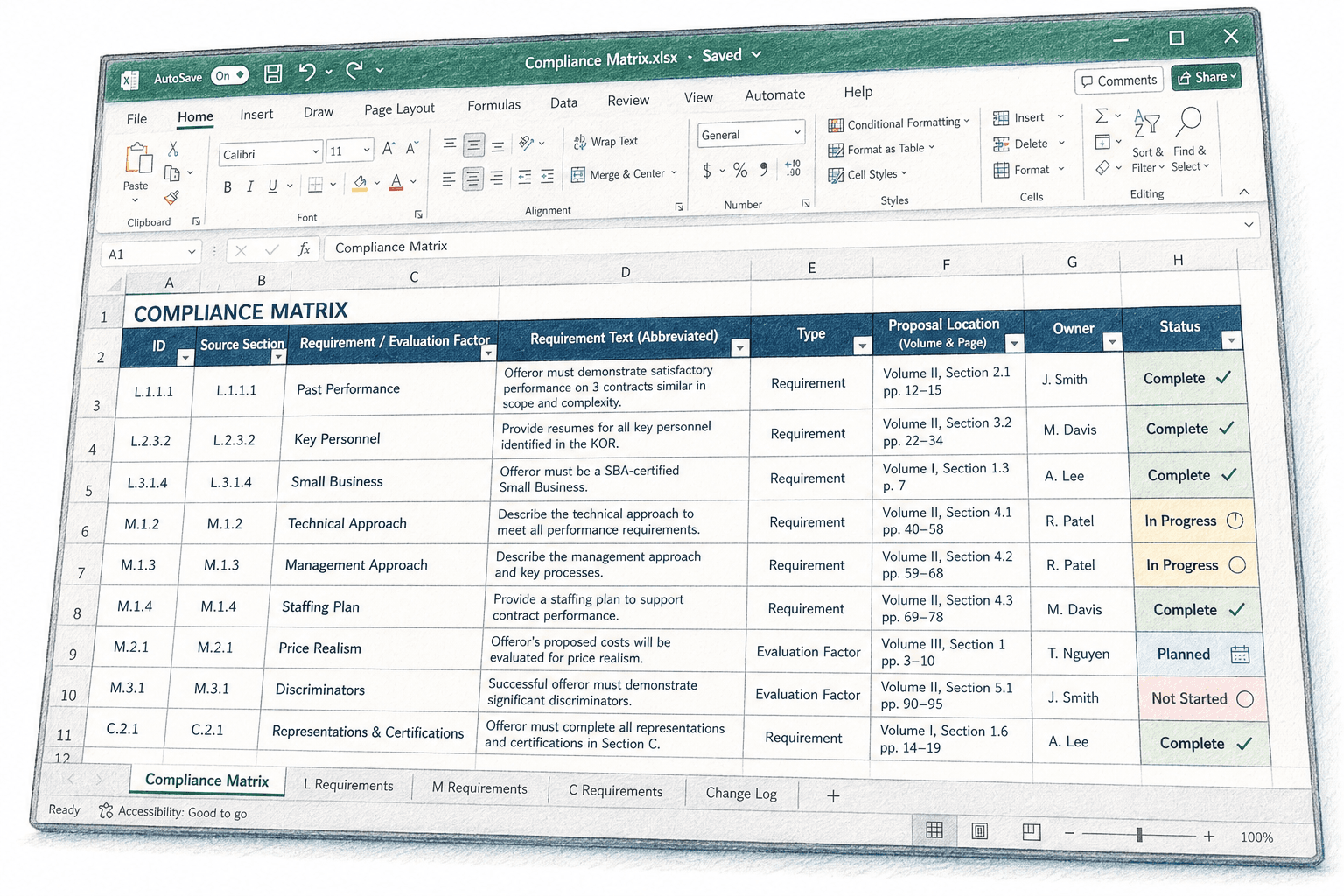
The compliance matrix is the one artifact that has to stay current through every amendment, every color team, and every last-minute scope change. When it lives in a tool your team doesn't fully control, version history, column structure, and subcontractor access all become someone else's decision. This guide covers how to keep it in Excel and maintain full ownership of structure, versioning, and access.
TLDR:
- Proposals without a compliance matrix are 2-3x more likely to be marked non-responsive during evaluation.
- Win rates on federal pursuits are typically low, making a single compliance failure costly to overall pursuit investment.
- Build your matrix section by section through Sections L, M, and C; keyword scanning misses requirements phrased as evaluation factors or embedded conditions.
- Keep one row per discrete requirement in your Excel template; grouping sub-requirements into parent rows is where teams miss enforceable obligations.
- Platform-native matrices can strip conditional formatting and require vendor seats for subcontractors; Excel ownership preserves file portability across SharePoint and shared drives.
- GovEagle generates Excel-native compliance matrices directly from Sections C, L, and M and automatically identifies changed requirements when amendments release.
What a Compliance Matrix Is in Federal Contracting
A compliance matrix is a structured table that maps every requirement from a federal solicitation to the exact proposal location where it's covered, along with who owns the response and its current status. For FAR Part 15 competitions, that means pulling requirements from Sections C, L, and M and giving each one a traceable row before a single page of narrative gets written. FAR Subpart 15.3 directs that proposals be evaluated solely on the factors and subfactors contained in the solicitation, which is precisely why traceable coverage of each Section M criterion matters before drafting begins.
Traceability is the point. Evaluators score what's submitted against documented criteria, and a matrix gives your team a running audit trail of what's been covered, what's still open, and where in the proposal each requirement lives. As one proposal resource notes, missed instructions buried deep in a solicitation are a leading cause of otherwise strong proposals getting rejected before pricing is even reviewed. IBR, a small business serving the Army, Navy, Air Force, and multiple Fed Civ agencies, found that using GovEagle as a compliance reviewer, which functioned as an additional pink team and red team layer, helped them win a spot on MDA Shield by catching gaps internal reviewers missed, while also cutting opportunity assessment time by 4 to 5x.
The matrix also functions as a coordination tool. Proposal managers use it to assign sections, flag gaps, and verify that amendment changes have been absorbed before submission.
Why Excel Is the Standard Format for Government Proposals
Excel's dominance in compliance matrix management isn't accidental. Proposal teams operate across Word and Excel by default, and the matrix needs to live where reviewers, writers, and managers already work, without requiring anyone to learn a new interface mid-pursuit.
The practical reasons hold up under pressure:
- Column structure is fully customizable, so teams can add RFP section references, page limits, response owners, and status flags without rebuilding from scratch
- Sorting and filtering let a proposal manager isolate every open requirement by volume or owner in seconds
- Conditional formatting makes compliance gaps visible at a glance, which matters when a Red Team reviewer is scanning 200 rows at speed; for a full walkthrough, see the compliance matrix build guide
- Excel files move freely across email, SharePoint, and shared drives with no export step or format conversion
There's also a compatibility argument. Your annotated outline lives in Word. Your basis of estimate lives in Excel. Keeping the compliance matrix in the same environment avoids the context-switching that slows teams down when deadlines compress. A matrix locked inside a web portal adds a friction point exactly where you need none.
The Core Components of a Government RFP Compliance Matrix
Each column earns its place by serving a different user at a different stage. The RFP reference and verbatim text columns protect against scope drift during drafting. Volume and location columns give evaluators a direct cross-reference path to verify coverage. Status and owner columns are what the proposal manager reads every morning to know where the pursuit actually stands.

| Column | What It Captures | Why It Matters |
|---|---|---|
| RFP Section Reference | Section C, L, or M citation | Ties each row back to the source document |
| Verbatim Requirement | Exact language from the solicitation | Prevents paraphrasing that misses scope |
| Proposal Volume / Section | Where the response lives | Gives evaluators a direct cross-reference path |
| Page / Paragraph Location | Specific location in the proposal | Speeds up color team review and final QC |
| Compliance Status | Compliant, partial, not covered | Surfaces gaps before submission |
| Owner / Author | Name or initials of the responsible writer | Drives accountability across the team |
| Notes | Flags, exceptions, or amendment ties | Captures judgment calls that raw status can't |
How to Build Your Compliance Matrix from Sections C, L, and M
Start with Section L. Every proposal instruction lives there, and each "shall," "must," or "the offeror will" is a row in your matrix. Work through it line by line before touching anything else.
Then pull Section M. Evaluation criteria aren't always written as explicit instructions, but if it's scored, it needs a row.
Section C follows. The PWS or SOO contains task areas and deliverables that generate their own compliance obligations, often separate from what Section L captures.
After those three, check:
- Attachments and exhibits for additional specifications or CDRLs
- Q&A amendments, which frequently add or modify requirements after initial release
- Section H and I clauses that carry proposal-specific representations or certifications
The discipline here is working section by section instead of scanning for keywords. Keyword scanning catches obvious "shall" statements but misses requirements phrased as preferences, evaluation factors, or embedded conditions. A systematic pass through each section keeps the matrix complete when it matters most.
Compliance Matrix Template Structure and Format Options
A baseline template built around Section L/M mapping works across most FAR Part 15 competitions without modification. The seven-column structure holds for full proposals, and the biggest time savings come from not rebuilding that structure every time a new RFP drops.
Where templates need adjustment is solicitation type:
- Full FAR Part 15 RFPs warrant every column, including page location and separate Section M scoring weight references, since evaluators compare your matrix against source selection criteria
- Task order responses under GWACs or IDIQs are typically narrower. PWS task areas drive the rows, and you can often collapse the volume/section column into a single "response location" field since task orders rarely span multiple volumes
- RFI and RFQ solicitations carry lighter compliance burdens. A stripped version with RFP reference, requirement text, response status, and owner is usually enough
The structural principle holds across all three: one row per discrete requirement, no grouping that buries a sub-requirement inside a parent row. Grouping is where teams miss things.
Keep a master template with all columns present and hide the ones that don't apply to a given solicitation. When a task order unexpectedly grows into a full proposal recompete, the structure is already there.
Managing Your Matrix in Excel: Formatting and Workflow Practices
When contributors are working across multiple schedules or time zones, even a well-structured matrix can degrade fast. A few formatting habits applied before distribution keep the file coherent under deadline pressure.

- Freeze the top row so column headers stay visible while scrolling through hundreds of requirements, which matters most when reviewers are jumping between sections during Red Team.
- Use data validation dropdowns on the status column to keep entries consistent across contributors and avoid the "in progress / in-progress / IP" fragmentation that makes compliance roll-ups unreliable.
- Apply conditional formatting to flag "not covered" rows in red and "partial" in yellow so gaps surface visually without requiring anyone to read every cell.
- Add a tab per volume on multi-volume pursuits so reviewers can work a single volume without scrolling past irrelevant sections.
- Lock column widths and row heights in your master template before distributing so the file does not visually fracture when opened across different Excel versions.
Get GovCon capture and proposal insights in your inbox.
Common Compliance Matrix Mistakes That Lead to Disqualification
Proposals without a compliance matrix are far more likely to be marked non-responsive during evaluation, and a compliance failure drains proposal investment that could have been directed to the next pursuit.
The most common failures:
- Requirements buried in attachments and exhibits that don't appear in Sections C, L, or M but still carry enforceable obligations
- Conflating Section L instructions with Section M evaluation factors, so the matrix tracks what to write but not what gets scored
- Failing to update the matrix after amendments, leaving rows tied to superseded language
- Blank ownership fields that let accountability gaps sit undetected until Red Team
The Section L versus M distinction is the one teams underestimate most. Traceability runs both directions: each requirement must link back to its source and forward to where it's answered. Collapsing L and M into a single pass misses evaluation factors that aren't framed as instructions but still shape how evaluators score.
Keeping Your Excel Matrix Current After RFP Amendments
Amendment 0003 drops at 4pm the day before a major milestone, and the first question is always the same: which rows changed?
Without a disciplined update process, teams either re-review the entire matrix or miss the modified rows entirely. A systematic approach starts before the amendment arrives:
- Add an "Amendment" column to your template from day one, with a dropdown for the amendment number that last touched each row
- When an amendment releases, work through it against the existing matrix line by line, flagging every row where source language changed, and capture what changed in a "Delta" column: new requirement, deleted requirement, or modified language
- Reset the status field on any updated row back to "open" and clear the existing owner if reassignment is needed
- Version the file immediately after folding in changes (v2_Amd0001, v3_Amd0002) so prior states are recoverable if a protest surfaces
The owner notification step is where teams lose time. Build a filter view that surfaces every row touched by the latest amendment, export it to a separate tab, and distribute that tab directly to affected writers instead of asking them to locate their rows inside a 300-row file. GovEagle's amendment tracking automatically identifies changed requirements when an agency releases an amendment and updates the matrix directly in Excel, eliminating the line-by-line reconciliation work before it starts; Book a Demo to see how it handles that step.
One structural habit worth adding: a dedicated amendment log tab recording each amendment number, its release date, and the row numbers it affected. When a subsequent amendment references a prior one, that log is the fastest way to trace requirement history without reopening multiple PDFs.
The Trade-Off of Platform-Native Matrices vs. Excel Ownership
Platform-native compliance matrix automation tools have real appeal in theory. A web interface with built-in collaboration, live status updates, and automatic requirement extraction makes sense when multiple contributors are working the same pursuit simultaneously.
The friction shows up downstream. Export options often flatten custom columns or strip conditional formatting your team spent an hour configuring. If a subcontractor or consultant needs to work the matrix, they need a seat in the vendor's system or a degraded export.
Version control is the other pressure point. In Excel, your versioning discipline is your own: v2_Amd0001 sits on SharePoint and you can recover it at any point during a protest or debrief.
- Platform-native matrices offer collaboration without file-passing and can tie requirement status directly to drafting workflows inside the same tool
- Excel ownership preserves template flexibility, subcontractor access, and file portability across email, SharePoint, and shared drives without export dependency
The lock-in typically surfaces mid-pursuit, when an amendment drops and the export Red Team reviewers need doesn't carry the columns that matter. The question worth asking before a tool goes into your stack: does the matrix stay yours in a format your team already owns, or does it live in someone else's system until you need it most?
How the Compliance Matrix Connects to Color Team Reviews
Color team reviews are only as useful as the compliance baseline reviewers are checking against. A matrix with stale rows or blank owners turns a Red Team into a gap-discovery exercise instead of a quality check, which is the wrong problem to be solving 72 hours from submission.
Each review stage uses the matrix differently:
- Pink Team reviewers check that every Section L requirement has a response location assigned and an owner attached. At this stage, the matrix is a coverage map, not a quality check.
- Red Team reviewers cross-reference Section M evaluation factors against drafted content, verifying that scorable criteria are explicitly covered where the matrix says they are. If the matrix is current, this takes minutes per section. If it isn't, reviewers rebuild it in real time.
- Gold Team confirms final traceability before submission, often producing a cross-reference matrix the government can use to verify compliance without hunting through volumes.
When an amendment updates a requirement after Pink Team and the matrix isn't refreshed, that gap typically won't surface until Red Team color review, costing review cycles you no longer have.
How GovEagle Generates Excel-Native Compliance Matrices for Federal Proposals
GovEagle shreds Sections C, L, and M directly from the RFP and generates the compliance matrix in Excel, the same file format your team already uses for every other pursuit artifact. No rebuilding inside a proprietary interface, no export that strips your conditional formatting, no seat requirements for subcontractors who need to work the file.
When an agency releases an amendment, GovEagle automatically identifies changed requirements and updates the matrix, so the gap-discovery work that typically consumes hours before Red Team is already done.
Chevo reported 40% faster proposal prep after adopting GovEagle, and customers across the portfolio average 50%+ time saved across the proposal lifecycle. GovEagle's FedRAMP Authorization may satisfy your agency's CUI requirements without an additional independent security review, depending on contract type. The compliance matrix generation connects to the full proposal lifecycle, from bid/no-bid through color team reviews, so the matrix stays current through submission.
Final Thoughts on Excel Compliance Matrices and Federal Proposal Traceability
Every column in your matrix exists to answer a question someone on your team will ask under deadline pressure: what is required, where did we put it, who owns it, and is it done. The teams that build that structure before drafting starts spend Red Team reviewing quality, not hunting gaps. GovEagle's proposal automation platform generates and maintains that structure directly in Excel, covering everything from initial RFP shred through amendment tracking and color team reviews.
FAQ
How do I build a compliance matrix for a government RFP without missing any requirements?
Work through Sections L, M, and C in sequence instead of scanning for keywords like "shall" or "must"; requirements phrased as preferences, evaluation factors, or embedded conditions won't surface in a keyword pass. After those three sections, check attachments, exhibits, Q&A amendments, and Sections H and I for additional obligations that carry enforceable weight even when they don't appear in the primary instruction sections.
How do I automatically track RFP amendments so my compliance matrix stays current throughout the proposal cycle?
See the amendment-tracking section above for the full step-by-step process. In short, build an Amendment column into your template from day one, work through each new amendment line by line, and reset the status on any modified row back to open. GovEagle automates this step by identifying changed requirements when an agency releases an amendment and updating the matrix directly, which removes the gap-discovery work that typically consumes hours before Red Team.
GovEagle compliance matrix vs. GovDash for Excel-native Section L/M output: what's the difference?
GovEagle generates the compliance matrix directly in Excel, preserving conditional formatting and custom columns without an export step, so subcontractors and consultants can work the file without needing a seat in the platform. GovDash builds compliance matrices within its web interface, which works well for teams that live in that environment but can create friction for teams with customized Excel templates who need to verify export compatibility before relying on it mid-pursuit.
What is a compliance matrix in federal contracting, and why does it matter for FAR Part 15 proposals?
A compliance matrix is a structured table that maps every requirement from Sections C, L, and M of a federal solicitation to the exact proposal location where it's covered, along with owner and status for each row. Evaluators score submissions against documented criteria, and proposals without a traceable matrix are roughly 2 to 3x more likely to be marked non-responsive during evaluation, often before pricing is even reviewed.
Should I manage my compliance matrix inside a proposal platform or keep it in Excel?
Excel ownership preserves template flexibility, subcontractor access, and file portability across SharePoint and shared drives without depending on a vendor's export function. Platform-native matrices offer built-in collaboration and can tie requirement status directly to drafting workflows, but the trade-off surfaces mid-pursuit when an amendment drops and the export your Red Team reviewers need doesn't carry the custom columns your team configured.